

Trip Tracka Community is an in-app space where members can ask travel questions, share updates and places, and talk with other travellers. Shared trips remain separate.
What you get with the travel community
Post questions, updates and tips for the community.
Show other travellers a place or trip you have saved.
Add photos to a post and bring the experience to life.
Reply to posts and react to useful ideas.
How it works in Trip Tracka
- 1
Open a conversation
Choose a community topic and browse the travel questions and updates there.
- 2
Share what you know
Write a post, add photos or share a saved place or trip when it helps explain the story.
- 3
Keep talking
Comment on a post or react to useful advice from another traveller.
See it in action
Explore how this feature works in Trip Tracka.
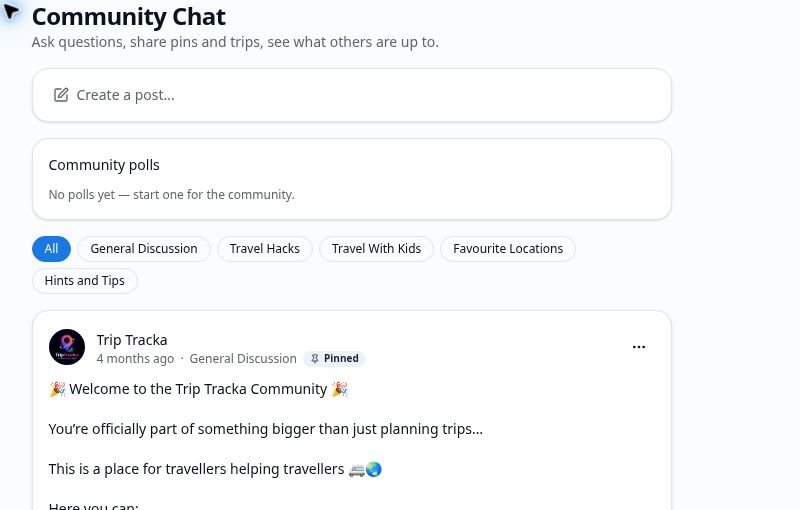
Trip Tracka Community gives you a place to ask about an upcoming destination, share what worked for you and discover ideas from other travellers.
Use it for the wider conversation, then invite friends into a private shared trip when you want to coordinate a particular route, stop or date.
- Questions and travel tips
- Photos and updates
- Share places and trips
- Comments and reactions
Frequently asked questions
What can I share with the community?+
Post travel questions, tips and updates, add photos, and share places or trips from Trip Tracka.
Can I reply to other travellers?+
Yes. Read posts, join the conversation in comments, and react to posts you find useful.
Is the community the same as a shared trip?+
No. Community posts are for wider travel conversations. Shared trips are for planning directly with people you invite.
Explore Trip Tracka
Start planning your next trip
Free to start. No credit card needed.