

Trip Tracka Marketplace helps travellers browse items and services near a chosen location or along a saved trip route, view listings on a map, and message sellers and service providers.
What you get with the Marketplace
Use your profile location, a place you choose, or your current location.
Look for listings close to a saved trip route with a corridor you can adjust.
Browse gear for sale and services in separate listing categories.
Ask a seller or provider about a specific listing in the app.
Switch between listing cards and a map while exploring an area.
Create and manage an item or service listing when you want to sell or offer help.
How it works in Trip Tracka
- 1
Set the search area
Search near a chosen location or along a saved trip route, then choose items or services.
- 2
Explore the listings
Switch between list and map views, use filters and open a listing for details.
- 3
Connect or list
Message a seller from a listing, or create your own item or service listing.
See it in action
Explore how this feature works in Trip Tracka.
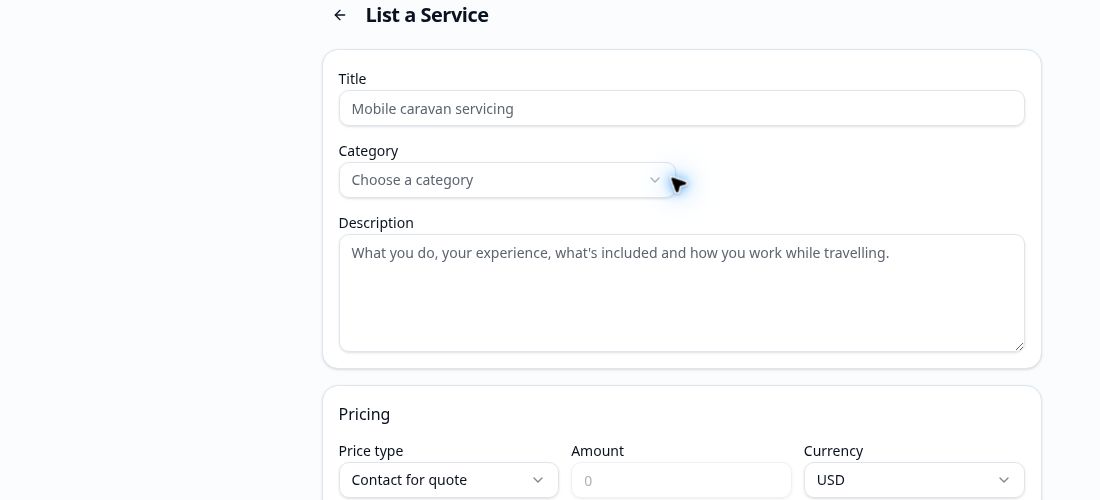
Set a location and explore travel gear or services nearby. If your next stop is already saved in Trip Tracka, search along that route and adjust the distance from the road to fit your trip.
Open a listing for details, then message its seller or service provider directly about it. When you have something to offer, create an item or service listing and manage it from your account.
Marketplace is designed around travel: your search can move with your plans without changing the location saved on your profile.
- Items and services
- Location search
- Search along a saved route
- Map and list views
- Listing messages
- Manage your listings
Frequently asked questions
What can I find in the Marketplace?+
Browse travel and camping items for sale and services offered by other members. Filter by item or service and search around a location.
Can I search along a planned trip?+
Yes. Choose a saved trip and search for listings near its route. You can adjust the search corridor to see more or fewer results.
How do I contact a seller or service provider?+
Open a listing and use its message button to start a conversation about that item or service.
Can I list something myself?+
Yes. Members can create an item listing or a service listing and manage their own listings inside Trip Tracka.
Explore Trip Tracka
Start planning your next trip
Free to start. No credit card needed.